WordPress カレンダー カスタマイズ
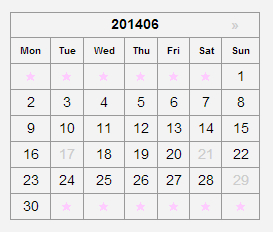
WordPressでカレンダーの表示部分をいじってみようかと思います。
どうやら、カレンダー関数の名前は get_calendar みたいで、
以下のファイルにありました。
wordpress/wp-includes/general-template.php
この記事は WordPress 本体を変更するやり方であまりよくないので、以下の記事の方を先に読んでください。
関連記事:WordPress カレンダー カスタマイズ(add_filter版)
WordPress カレンダーの曜日を英語にする
STINGER3 でデフォルトでカレンダーを出すとこんな感じです。
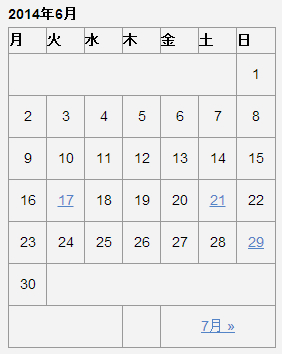
まず、曜日を英語にし、センター揃えにしてみます。
wordpress/wp-includes/locale.php ファイルの中の、
109行辺り
__('S_Sunday_initial');
__('M_Monday_initial');
__('T_Tuesday_initial');
__('W_Wednesday_initial');
__('T_Thursday_initial');
__('F_Friday_initial');
__( ); を取っても可能ですが、他でも使われているかもしれなので、
今回はgeneral-template.phpの中で表示直前で力ずくで、変換しようと思います。
general-template.php
1475行あたり
$day_name = (true == $initial) ? $wp_locale->get_weekday_initial($wd) : $wp_locale->get_weekday_abbrev($wd);
↓
この下に以下を入れます。
if($day_name=='日')$day_name='Sun';
if($day_name=='月')$day_name='Mon';
if($day_name=='火')$day_name='Tue';
if($day_name=='水')$day_name='Wed';
if($day_name=='木')$day_name='Thu';
if($day_name=='金')$day_name='Fri';
if($day_name=='土')$day_name='Sat';
↓
あとはstyle.cssで調整します。
#wp-calendar th {
	text-align: center;
	padding: 0px; font-size: x-small;
}
WordPress キャプションの”月”を消す
”7月2014” の ”月” 部分も力ずくで消してみようと思います。
general-template.php
1462行あたり
$calendar_caption = _x('%1$s %2$s', 'calendar caption');
↓
以下のコードに変更
$calendar_caption = '%2$s'.$thismonth;
captionタグ はスマホなどでborderがずれるので thタグ に変更します。
1463行あたり
$calendar_output = '<table id="wp-calendar">
	<caption>' . sprintf($calendar_caption, $wp_locale->get_month($thismonth), date('Y', $unixmonth)) . '</caption>
	<thead>
	<tr>';
↓
以下のコードに変更
$calendar_output = '<table id="wp-calendar">
	<thead>
	<tr><th id="calendar-caption" colspan="7">' . sprintf($calendar_caption, $wp_locale->get_month($thismonth), date('Y', $unixmonth)) . '</th></tr>
	<tr>';
WordPress 前の月(prev)と次の月(next)を上に持ってくる
カレンダーの表示はテーブルになっているので、テーブルから外に出して、
新しく作った
<div id="wp-calendar-pn"> </div>
の中に入れて、
floatさせて上に持ってこようと思います。
カレンダーの表示は、
calendar_output 変数にどんどんputしている感じなので、
calendar_output2 変数を作ってそこにとりあえず入れておきます。
general-template.php
1487行あたりの以下の部分をコメントアウトして、
if ( $previous ) {
        ( ・・・・省略 ・・・・ )
	<tbody>
	<tr>';
↓
以下のコードに変更
if( $previous || $next)$calendar_output2 = "\n\t".'<div id="wp-calendar-pn">';
if ( $previous ) {
$calendar_output2 .= "\n\t\t".'<a id="prev" href="' . get_month_link($previous->year, $previous->month) . '" title="' . esc_attr( sprintf(__('View posts for %1$s %2$s'), $wp_locale->get_month($previous->month), date('Y', mktime(0, 0 , 0, $previous->month, 1, $previous->year)))) . '">«</a>';
}
if ( $next ) {
$calendar_output2 .= "\n\t\t".'<a id="next" href="' . get_month_link($next->year, $next->month) . '" title="' . esc_attr( sprintf(__('View posts for %1$s %2$s'), $wp_locale->get_month($next->month), date('Y', mktime(0, 0 , 0, $next->month, 1, $next->year))) ) . '">»</a>';
}
if( $previous || $next)$calendar_output2 .= "\n\t".'</div>'."\n";
general-template.php
1578行あたり
$calendar_output .= "\n\t</tr>\n\t</tbody>\n\t</table>";
の下に、以下のコードを足します。
$calendar_output .= $calendar_output2;
style.cssのカレンダーの部分に以下を足します。
#calendar_wrap{
position:relative;
}
#wp-calendar-pn{
width: 248px;margin-left: 35px;
position:absolute;top:0;left:0;
}
#prev{ float:left;margin-left:20px;}
#next{ float:right;margin-right:20px;}
WordPress 空のセルに星マーク(★)を表示したい
今の表示はこんな感じです。
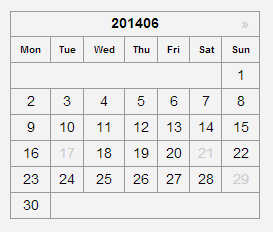
日にちのセルで colspan されてる部分は分割し、テキストの星マーク(★)を入れようと思います。
general-template.php
1550行あたり
if ( 0 != $pad ) $calendar_output .= "\n\t\t".'<td colspan="'. esc_attr($pad) .'" class="pad"> </td>';
↓ 以下に変更
if ( 0 != $pad ){
	for ( $i = 0; $i < $pad; $i++ )
	$calendar_output .= "\n\t\t".'<td class="pad">★</td>';
}
1575行あたり
if ( $pad != 0 && $pad != 7 ) $calendar_output .= "\n\t\t".'<td class="pad" colspan="'. esc_attr($pad) .'"> </td>';
↓ 以下に変更
if ( $pad != 0 && $pad != 7 ){
	for ( $i = 0; $i < $pad; $i++ )
		$calendar_output .= "\n\t\t".'<td class="pad">★</td>';
}
$calendar_output .= "\n\t</tr>\n\t</tbody>\n\t</table>";
あとはCSSでpadクラスを調整します。
結果 style.css のカレンダー部分は以下になります。
style.css(カレンダーの部分)
/*-----------------------------------
カレンダー
------------------------------------*/
#wp-calendar {
	border-collapse: collapse;
	border-top-width: 1px;
	border-right-width: 1px;
	border-top-style: solid;
	border-right-style: solid;
	border-top-color: #999;
	border-right-color: #999;
	width: 250px;
	margin-left: 35px;
}
#wp-calendar thead tr th {
	border-bottom-width: 1px;
	border-left-width: 1px;
	border-bottom-style: solid;
	border-left-style: solid;
	border-bottom-color: #999;
	border-left-color: #999;
}
#wp-calendar th {
	text-align: center;
	padding: 0px; font-size: x-small;
}
#wp-calendar td {
	text-align: center;
	padding: 0px;
}
#wp-calendar #calendar-caption {
	font-weight: bold;
	text-align: center;
	font-size: small;
}
#calendar_wrap a{text-decoration:none; color:#CCC;}
#wp-calendar #today {
	background-color: #CCC;
}
#wp-calendar #today a{
	color:#fff;
}
#calendar_wrap{
position:relative;
}

#wp-calendar-pn{
width: 250px;margin-left: 35px;
position:absolute;top:0;left:0;
}
#prev{ float:left;
margin-left:20px;
}
#next{ float:right;margin-right:20px;}
#wp-calendar .pad{ color:#FFCCFF; font-size: x-small;}
参考に general-template.php ファイルとスマホのCSSも
アップしておきますので、よかったらどうぞ。
general-template.php (ZIP ダウンロード)
スマートフォン用の CSS はこちら↓
smart.css(カレンダーの部分)
/*-----------------------------------
カレンダー
------------------------------------*/
#wp-calendar {
	border-collapse: collapse;
	border-top-width: 1px;
	border-right-width: 1px;
	border-top-style: solid;
	border-right-style: solid;
	border-top-color: #999;
	border-right-color: #999;
	width: 100%;
	margin-top:20px;
}
#wp-calendar thead tr th {
	border-bottom-width: 1px;
	border-left-width: 1px;
	border-bottom-style: solid;
	border-left-style: solid;
	border-bottom-color: #999;
	border-left-color: #999;
}
#wp-calendar td {
	text-align: center;
	padding: 5px;
	border-bottom-width: 1px;
	border-left-width: 1px;
	border-bottom-style: solid;
	border-left-style: solid;
	border-bottom-color: #999;
	border-left-color: #999;
}
#wp-calendar #calendar-caption {
	font-weight: bold;
	text-align: center;
	font-size: small;
}
#calendar_wrap a{text-decoration:none; color:#CCC;}
#wp-calendar #today {
	background-color: #CCC;
}
#wp-calendar #today a{
	color:#fff;
}
#calendar_wrap{
position:relative;
}

#wp-calendar-pn{
width: 100%;position:absolute;top:0;left:0;
}
#prev{ float:left;margin-left:20px;}
#next{ float:right;margin-right:20px;}
#wp-calendar .pad{ color:#FFCCFF; font-size: x-small;}

関連記事
-

-
WordPress タイトルの変更
テンプレートタグ the_title(); get_the_title(); WordPress
-

-
Javascript 写真ギャラリー サムネイルスライド横 レスポンシブ対応
Javascript でマウスドラッグのテストをしていきます。 分かりやすいように、ボールを投げる
-

-
【CSS セレクタ】その2:擬似クラスセレクタやラジオボタンチェックでフォームの有効無効や枠の色変えたいとか
<今回のピックアップ項目> :link :visited :hover :active :t
-

-
フルスクリーンを CSS だけで、vw, vh, vmin, vmax を試してみる(スクロールバーも消したい)
ビューポートの単位 vw, vh, vmin, vmax CSS で大きさを指定する時、px や
-
-
WordPress 独自テーブル
Wordpress で独自テーブルを作ってみようと思います。 独自テーブルのデータ 今回のデ
-
-
WordPress レスポンシブ テンプレート の メニューやブログの設置
前回の 「WordPress レスポンシブ テンプレートコーポレート用(シンプル・カスタマイズ用)ダ
-
-
「All-in-One WP Migration」プラグインで 簡単に WordPress のサーバー移行する手順メモ
1.移行元サイトでのデータエクスポート 「All-in-One WP Migration(公式リン
-

-
ロリポップでWordPressのPHPバージョン7.1に変更後「サイトに技術的な問題が発生しています。」
WordPress.org の推奨環境 PHP7以上 MySQL5.6以上またはMaria
-
-
WordPress 自作フォーム その1(サンプルと設置)
Wordpress でプラグインを使わずにフォームをやってみます。 簡単に名前、メールアドレス、メ
-
-
WordPress 自作フォーム その3(チェックボックスなど)
以前、WordPress 自作フォーム その1の記事で Wordpress で自作フォームを作ってみ
- PREV
- 繰り返し背景を全面表示してアニメーションする
- NEXT
- Web フォント とは?