WordPress カレンダー カスタマイズ(add_filter版)
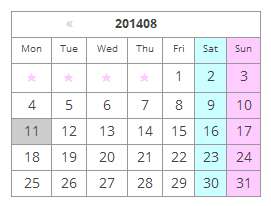
前回、「WordPress の PHP をちょっと見てみよう Ⅲ」でフックをやったので、カレンダーで試してみようと思います。
前記事で行った、「WordPress カレンダー カスタマイズ」は、/wp-includes/general-template.php の get_calendar() を直接変更してやっていました。
今回は、add_filter() を使うので、get_calendar() をいじらずにカレンダーをカスタマイズ出来るので、その方がいいかと思います。
カレンダーの表示の仕方
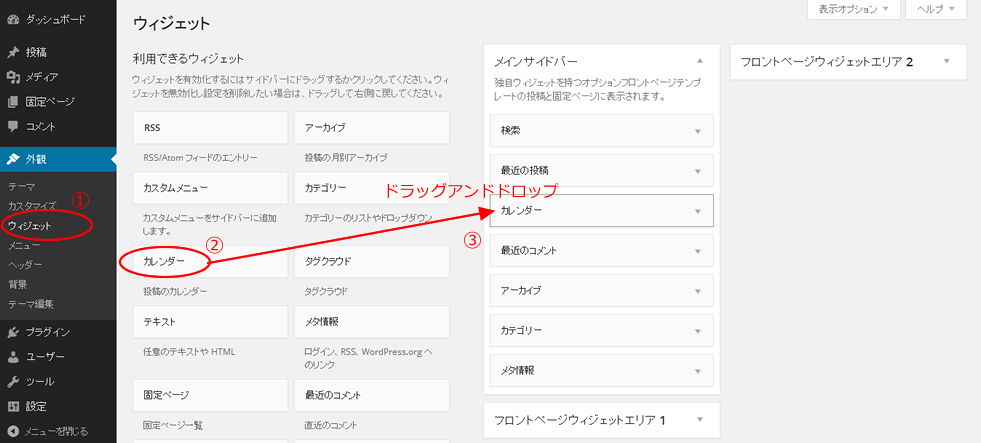
デフォルトでは表示していないカレンダーを表示するには、
ダッシュボード → 外観 → ウィジェットを選択
利用できるウィジェットの一覧から「カレンダー」ボタンを「サイドバー」の欄にドラッグアンドドロップします。
add_filter() でカレンダーをカスタマイズ
今回はデフォルトのテーマ twentytwelve で見てみると、こんな感じです。

テーマの function.php に add_filter() を使って、カレンダーの関数 get_calendar() をフックします。
テーマの function.php に以下を追加します。
add_filter('get_calendar', 'my_calendar');
function my_calendar($initial = true, $echo = true) {
global $wpdb, $m, $monthnum, $year, $wp_locale, $posts;
// week_begins = 0 stands for Sunday
$week_begins = intval(get_option('start_of_week'));
// Let's figure out when we are
if ( !empty($monthnum) && !empty($year) ) {
$thismonth = ''.zeroise(intval($monthnum), 2);
$thisyear = ''.intval($year);
} elseif ( !empty($w) ) {
// We need to get the month from MySQL
$thisyear = ''.intval(substr($m, 0, 4));
$d = (($w - 1) * 7) + 6; //it seems MySQL's weeks disagree with PHP's
$thismonth = $wpdb->get_var("SELECT DATE_FORMAT((DATE_ADD('{$thisyear}0101', INTERVAL $d DAY) ), '%m')");
} elseif ( !empty($m) ) {
$thisyear = ''.intval(substr($m, 0, 4));
if ( strlen($m) < 6 )
$thismonth = '01';
else
$thismonth = ''.zeroise(intval(substr($m, 4, 2)), 2);
} else {
$thisyear = gmdate('Y', current_time('timestamp'));
$thismonth = gmdate('m', current_time('timestamp'));
}
$unixmonth = mktime(0, 0 , 0, $thismonth, 1, $thisyear);
$last_day = date('t', $unixmonth);
// Get the next and previous month and year with at least one post
$previous = $wpdb->get_row("SELECT MONTH(post_date) AS month, YEAR(post_date) AS year
FROM $wpdb->posts
WHERE post_date < '$thisyear-$thismonth-01'
AND post_type = 'post' AND post_status = 'publish'
ORDER BY post_date DESC
LIMIT 1");
$next = $wpdb->get_row("SELECT MONTH(post_date) AS month, YEAR(post_date) AS year
FROM $wpdb->posts
WHERE post_date > '$thisyear-$thismonth-{$last_day} 23:59:59'
AND post_type = 'post' AND post_status = 'publish'
ORDER BY post_date ASC
LIMIT 1");
/* translators: Calendar caption: 1: month name, 2: 4-digit year */
//$calendar_caption = _x('%1$s %2$s', 'calendar caption');
$calendar_caption = '%2$s'.$thismonth;
$calendar_output = '<table id="wp-calendar">
<thead>
<tr><th id="calendar-caption" colspan="7">' . sprintf($calendar_caption, $wp_locale->get_month($thismonth), date('Y', $unixmonth)) . '</th></tr>
<tr>';
$myweek = array();
for ( $wdcount=0; $wdcount<=6; $wdcount++ ) {
$myweek[] = $wp_locale->get_weekday(($wdcount+$week_begins)%7);
}
foreach ( $myweek as $wd ) {
$day_name = (true == $initial) ? $wp_locale->get_weekday_initial($wd) : $wp_locale->get_weekday_abbrev($wd);
if($day_name=='日')$day_name='Sun';
if($day_name=='月')$day_name='Mon';
if($day_name=='火')$day_name='Tue';
if($day_name=='水')$day_name='Wed';
if($day_name=='木')$day_name='Thu';
if($day_name=='金')$day_name='Fri';
if($day_name=='土')$day_name='Sat';
$wd = esc_attr($wd);
$calendar_output .= "\n\t\t<th scope=\"col\" title=\"$wd\">$day_name</th>";
}
$calendar_output .= '
</tr>
</thead>
<tfoot>
<tr>';
//////////////////ここから変更した
if( $previous || $next)$calendar_output2 = "\n\t".'<div id="wp-calendar-pn">';
if ( $previous ) {
$calendar_output2 .= "\n\t\t".'<a id="prev" href="' . get_month_link($previous->year, $previous->month) . '" title="' . esc_attr( sprintf(__('View posts for %1$s %2$s'), $wp_locale->get_month($previous->month), date('Y', mktime(0, 0 , 0, $previous->month, 1, $previous->year)))) . '">«</a>';
}
if ( $next ) {
$calendar_output2 .= "\n\t\t".'<a id="next" href="' . get_month_link($next->year, $next->month) . '" title="' . esc_attr( sprintf(__('View posts for %1$s %2$s'), $wp_locale->get_month($next->month), date('Y', mktime(0, 0 , 0, $next->month, 1, $next->year))) ) . '">»</a>';
}
if( $previous || $next)$calendar_output2 .= "\n\t".'</div>'."\n";
//////////////////ここまで変更した
// Get days with posts
$dayswithposts = $wpdb->get_results("SELECT DISTINCT DAYOFMONTH(post_date)
FROM $wpdb->posts WHERE post_date >= '{$thisyear}-{$thismonth}-01 00:00:00'
AND post_type = 'post' AND post_status = 'publish'
AND post_date <= '{$thisyear}-{$thismonth}-{$last_day} 23:59:59'", ARRAY_N);
if ( $dayswithposts ) {
foreach ( (array) $dayswithposts as $daywith ) {
$daywithpost[] = $daywith[0];
}
} else {
$daywithpost = array();
}
if (strpos($_SERVER['HTTP_USER_AGENT'], 'MSIE') !== false || stripos($_SERVER['HTTP_USER_AGENT'], 'camino') !== false || stripos($_SERVER['HTTP_USER_AGENT'], 'safari') !== false)
$ak_title_separator = "\n";
else
$ak_title_separator = ', ';
$ak_titles_for_day = array();
$ak_post_titles = $wpdb->get_results("SELECT ID, post_title, DAYOFMONTH(post_date) as dom "
."FROM $wpdb->posts "
."WHERE post_date >= '{$thisyear}-{$thismonth}-01 00:00:00' "
."AND post_date <= '{$thisyear}-{$thismonth}-{$last_day} 23:59:59' "
."AND post_type = 'post' AND post_status = 'publish'"
);
if ( $ak_post_titles ) {
foreach ( (array) $ak_post_titles as $ak_post_title ) {
/** This filter is documented in wp-includes/post-template.php */
$post_title = esc_attr( apply_filters( 'the_title', $ak_post_title->post_title, $ak_post_title->ID ) );
if ( empty($ak_titles_for_day['day_'.$ak_post_title->dom]) )
$ak_titles_for_day['day_'.$ak_post_title->dom] = '';
if ( empty($ak_titles_for_day["$ak_post_title->dom"]) ) // first one
$ak_titles_for_day["$ak_post_title->dom"] = $post_title;
else
$ak_titles_for_day["$ak_post_title->dom"] .= $ak_title_separator . $post_title;
}
}
// See how much we should pad in the beginning
$pad = calendar_week_mod(date('w', $unixmonth)-$week_begins);
/////ここから変更
//if ( 0 != $pad )
//$calendar_output .= "\n\t\t".'<td colspan="'. esc_attr($pad) .'" class="pad"> </td>';
if ( 0 != $pad ){
for ( $i = 0; $i < $pad; $i++ )
$calendar_output .= "\n\t\t".'<td class="pad">★</td>';
}
/////ここまで変更
$daysinmonth = intval(date('t', $unixmonth));
for ( $day = 1; $day <= $daysinmonth; ++$day ) {
if ( isset($newrow) && $newrow )
$calendar_output .= "\n\t</tr>\n\t<tr>\n\t\t";
$newrow = false;
if ( $day == gmdate('j', current_time('timestamp')) && $thismonth == gmdate('m', current_time('timestamp')) && $thisyear == gmdate('Y', current_time('timestamp')) )
$calendar_output .= '<td id="today">';
else
$calendar_output .= '<td>';
if ( in_array($day, $daywithpost) ) // any posts today?
$calendar_output .= '<a href="' . get_day_link( $thisyear, $thismonth, $day ) . '" title="' . esc_attr( $ak_titles_for_day[ $day ] ) . "\">$day</a>";
else
$calendar_output .= $day;
$calendar_output .= '</td>';
if ( 6 == calendar_week_mod(date('w', mktime(0, 0 , 0, $thismonth, $day, $thisyear))-$week_begins) )
$newrow = true;
}
$pad = 7 - calendar_week_mod(date('w', mktime(0, 0 , 0, $thismonth, $day, $thisyear))-$week_begins);
/////ここから変更
//if ( $pad != 0 && $pad != 7 )
//$calendar_output .= "\n\t\t".'<td class="pad" colspan="'. esc_attr($pad) .'"> </td>';
if ( $pad != 0 && $pad != 7 ){
for ( $i = 0; $i < $pad; $i++ )
$calendar_output .= "\n\t\t".'<td class="pad">★</td>';
}
/////ここまで変更
$calendar_output .= "\n\t</tr>\n\t</tbody>\n\t</table>";
//ここで足す
$calendar_output .= $calendar_output2;
echo $calendar_output;
}
カレンダーの CSS のところは以下のように変更します。
/*-----------------------------------
カレンダー
------------------------------------*/
#wp-calendar {
    border-collapse: collapse;
    border-top-width: 1px;
    border-right-width: 1px;
    border-top-style: solid;
    border-right-style: solid;
    border-top-color: #999;
    border-right-color: #999;
    width: 250px;
}
#wp-calendar thead tr th {
    border-bottom-width: 1px;
    border-left-width: 1px;
    border-bottom-style: solid;
    border-left-style: solid;
    border-bottom-color: #999;
    border-left-color: #999;
}
#wp-calendar th {
    text-align: center;height:20px;
     padding-top: 5px; font-size: x-small;
}
#wp-calendar td {
    text-align: center;height:20px;
    padding-top: 5px;
    border-bottom-width: 1px;
    border-left-width: 1px;
    border-bottom-style: solid;
    border-left-style: solid;
    border-bottom-color: #999;
    border-left-color: #999;
}
#wp-calendar #calendar-caption {
    font-weight: bold;
    text-align: center;
    font-size: small;
}
#calendar_wrap a{text-decoration:none; color:#CCC;}
#wp-calendar #today {
    background-color: #CCC;
}
#wp-calendar #today a{
    color:#fff;
}
#calendar_wrap{
position:relative;
}

#wp-calendar-pn{
width: 250px;margin-left: 35px;
position:absolute;top:5px;left:0;
}
#prev{ float:left;
margin-left:20px;
}
#next{ float:right;margin-right:20px;}
#wp-calendar .pad{ color:#FFCCFF; font-size: x-small;}
表示はこんな感じで出来ました。
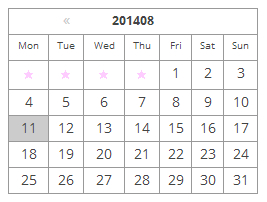
細かいコードの説明は、前記事「WordPress カレンダー カスタマイズ」と同じなので省略します。
自分でカスタマイズしたい場合
このデザインではなく、自分でカスタマイズしたい場合は、テーマの function.php に get_calendar() の内容を my_calender() としてコピペすれば出来そうなのですが、エラーになるので、以下の部分の削除などが必要になります。
1390 ~ 1419 行あたりの以下の部分と、
$cache = array();
	$key = md5( $m . $monthnum . $year );
	if ( $cache = wp_cache_get( 'get_calendar', 'calendar' ) ) {
・・・・・(省略)・・・・・
	if ( isset($_GET['w']) )
		$w = ''.intval($_GET['w']);
1580 ~ 1595 行あたりの以下の部分を削除して、
$cache[ $key ] = $calendar_output;
	wp_cache_set( 'get_calendar', $cache, 'calendar' );
・・・・・(省略)・・・・・
	/** This filter is documented in wp-includes/general-template.php */
		return apply_filters( 'get_calendar', $calendar_output );
	}
以下を加えます。
echo $calendar_output;
そうすれば、function.php の中でカレンダーを好きなようにカスタマイズ出来るかと思います。
WordPress 土日にクラスを付けて色を変えたい
最後に、土日にクラスを付けて色を変えてみようと思います。
if ( $day == gmdate('j', current_time('timestamp')) && $thismonth == gmdate('m', current_time('timestamp')) && $thisyear == gmdate('Y', current_time('timestamp')) )
			$calendar_output .= '<td id="today">';
↓ の下に以下のコードを追加
else if(5 == calendar_week_mod(date('w', mktime(0, 0 , 0, $thismonth, $day, $thisyear))-$week_begins))$calendar_output .= '<td id="class-td">';
else if(6 == calendar_week_mod(date('w', mktime(0, 0 , 0, $thismonth, $day, $thisyear))-$week_begins))$calendar_output .= '<td id="class-td">';
foreach ( $myweek as $wd ) {
		$day_name = (true == $initial) ? $wp_locale->get_weekday_initial($wd) : $wp_locale->get_weekday_abbrev($wd);
↓ の下に以下のコードを追加
if($day_name=='日')$wday_class =' class="sun-td"';
if($day_name=='土')$wday_class =' class="sat-td"';
CSSに追加
#wp-calendar .sat-td{ background:#CCFFFF;}
#wp-calendar .sun-td{ background:#FFCCFF;}
表示はこのような感じで出来ました。

関連記事
-

-
日本語対応の オープンソースの美しい フォント Noto Sans CJK が出来たらしい
Google Earth が出来た時も、Google ストリートビューが出来た時も、 Google
-

-
WordPress レスポンシブ テンプレート 元にサイトを作ってみる その2
DEMO を見る カスタム投稿タイプ functions.php 今回は3つのリストメニュ
-

-
WordPress で VR させて、360°のパノラマ画像を表示する
WordPress.com内ショートコードで VR させる WordPress.com内で、VR(
-
-
WordPress 独自テーブル
Wordpress で独自テーブルを作ってみようと思います。 独自テーブルのデータ 今回のデ
-

-
繰り返し背景を全面表示してアニメーションする
前回の「背景を SVG で全面表示し、パターン化をアニメーションさせる」がSVGの要素を全て対応して
-

-
WordPress 自作フォーム その3(チェックボックスなど)
以前、WordPress 自作フォーム その1の記事で Wordpress で自作フォームを作ってみ
-

-
WordPress 自作フォーム その1(サンプルと設置)
Wordpress でプラグインを使わずにフォームをやってみます。 簡単に名前、メールアドレス、メ
-
-
CSS 三角で吹き出しを作る
吹き出しとか三角とかよく使うのに、いちいち調べてどれ使おうかといつもやっていたので、まとめて作ってお
-

-
Javascript 写真ギャラリー サムネイルスライド横 レスポンシブ対応
Javascript でマウスドラッグのテストをしていきます。 分かりやすいように、ボールを投げる
-

-
WordPress の PHP をちょっと見てみよう Ⅱ
前記事の続きで、wp-settings.php の68行目あたりから見ていきます。 <今回のピ
- PREV
- WordPress の PHP をちょっと見てみよう Ⅲ
- NEXT
- Web アイコンフォント 作り方