WordPress カレンダー カスタマイズ(add_filter版)
前回、「WordPress の PHP をちょっと見てみよう Ⅲ」でフックをやったので、カレンダーで試してみようと思います。
前記事で行った、「WordPress カレンダー カスタマイズ」は、/wp-includes/general-template.php の get_calendar() を直接変更してやっていました。
今回は、add_filter() を使うので、get_calendar() をいじらずにカレンダーをカスタマイズ出来るので、その方がいいかと思います。
カレンダーの表示の仕方
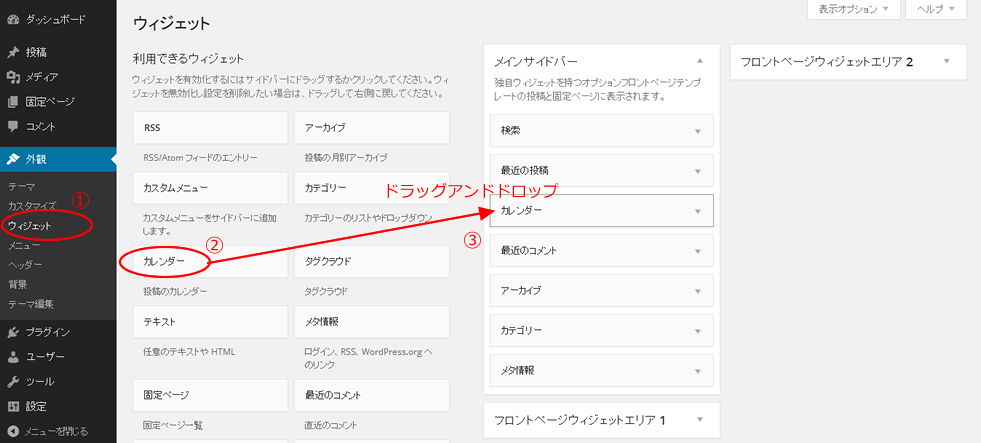
デフォルトでは表示していないカレンダーを表示するには、
ダッシュボード → 外観 → ウィジェットを選択
利用できるウィジェットの一覧から「カレンダー」ボタンを「サイドバー」の欄にドラッグアンドドロップします。
add_filter() でカレンダーをカスタマイズ
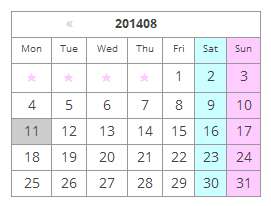
今回はデフォルトのテーマ twentytwelve で見てみると、こんな感じです。

テーマの function.php に add_filter() を使って、カレンダーの関数 get_calendar() をフックします。
テーマの function.php に以下を追加します。
add_filter('get_calendar', 'my_calendar');
function my_calendar($initial = true, $echo = true) {
global $wpdb, $m, $monthnum, $year, $wp_locale, $posts;
// week_begins = 0 stands for Sunday
$week_begins = intval(get_option('start_of_week'));
// Let's figure out when we are
if ( !empty($monthnum) && !empty($year) ) {
$thismonth = ''.zeroise(intval($monthnum), 2);
$thisyear = ''.intval($year);
} elseif ( !empty($w) ) {
// We need to get the month from MySQL
$thisyear = ''.intval(substr($m, 0, 4));
$d = (($w - 1) * 7) + 6; //it seems MySQL's weeks disagree with PHP's
$thismonth = $wpdb->get_var("SELECT DATE_FORMAT((DATE_ADD('{$thisyear}0101', INTERVAL $d DAY) ), '%m')");
} elseif ( !empty($m) ) {
$thisyear = ''.intval(substr($m, 0, 4));
if ( strlen($m) < 6 )
$thismonth = '01';
else
$thismonth = ''.zeroise(intval(substr($m, 4, 2)), 2);
} else {
$thisyear = gmdate('Y', current_time('timestamp'));
$thismonth = gmdate('m', current_time('timestamp'));
}
$unixmonth = mktime(0, 0 , 0, $thismonth, 1, $thisyear);
$last_day = date('t', $unixmonth);
// Get the next and previous month and year with at least one post
$previous = $wpdb->get_row("SELECT MONTH(post_date) AS month, YEAR(post_date) AS year
FROM $wpdb->posts
WHERE post_date < '$thisyear-$thismonth-01'
AND post_type = 'post' AND post_status = 'publish'
ORDER BY post_date DESC
LIMIT 1");
$next = $wpdb->get_row("SELECT MONTH(post_date) AS month, YEAR(post_date) AS year
FROM $wpdb->posts
WHERE post_date > '$thisyear-$thismonth-{$last_day} 23:59:59'
AND post_type = 'post' AND post_status = 'publish'
ORDER BY post_date ASC
LIMIT 1");
/* translators: Calendar caption: 1: month name, 2: 4-digit year */
//$calendar_caption = _x('%1$s %2$s', 'calendar caption');
$calendar_caption = '%2$s'.$thismonth;
$calendar_output = '<table id="wp-calendar">
<thead>
<tr><th id="calendar-caption" colspan="7">' . sprintf($calendar_caption, $wp_locale->get_month($thismonth), date('Y', $unixmonth)) . '</th></tr>
<tr>';
$myweek = array();
for ( $wdcount=0; $wdcount<=6; $wdcount++ ) {
$myweek[] = $wp_locale->get_weekday(($wdcount+$week_begins)%7);
}
foreach ( $myweek as $wd ) {
$day_name = (true == $initial) ? $wp_locale->get_weekday_initial($wd) : $wp_locale->get_weekday_abbrev($wd);
if($day_name=='日')$day_name='Sun';
if($day_name=='月')$day_name='Mon';
if($day_name=='火')$day_name='Tue';
if($day_name=='水')$day_name='Wed';
if($day_name=='木')$day_name='Thu';
if($day_name=='金')$day_name='Fri';
if($day_name=='土')$day_name='Sat';
$wd = esc_attr($wd);
$calendar_output .= "\n\t\t<th scope=\"col\" title=\"$wd\">$day_name</th>";
}
$calendar_output .= '
</tr>
</thead>
<tfoot>
<tr>';
//////////////////ここから変更した
if( $previous || $next)$calendar_output2 = "\n\t".'<div id="wp-calendar-pn">';
if ( $previous ) {
$calendar_output2 .= "\n\t\t".'<a id="prev" href="' . get_month_link($previous->year, $previous->month) . '" title="' . esc_attr( sprintf(__('View posts for %1$s %2$s'), $wp_locale->get_month($previous->month), date('Y', mktime(0, 0 , 0, $previous->month, 1, $previous->year)))) . '">«</a>';
}
if ( $next ) {
$calendar_output2 .= "\n\t\t".'<a id="next" href="' . get_month_link($next->year, $next->month) . '" title="' . esc_attr( sprintf(__('View posts for %1$s %2$s'), $wp_locale->get_month($next->month), date('Y', mktime(0, 0 , 0, $next->month, 1, $next->year))) ) . '">»</a>';
}
if( $previous || $next)$calendar_output2 .= "\n\t".'</div>'."\n";
//////////////////ここまで変更した
// Get days with posts
$dayswithposts = $wpdb->get_results("SELECT DISTINCT DAYOFMONTH(post_date)
FROM $wpdb->posts WHERE post_date >= '{$thisyear}-{$thismonth}-01 00:00:00'
AND post_type = 'post' AND post_status = 'publish'
AND post_date <= '{$thisyear}-{$thismonth}-{$last_day} 23:59:59'", ARRAY_N);
if ( $dayswithposts ) {
foreach ( (array) $dayswithposts as $daywith ) {
$daywithpost[] = $daywith[0];
}
} else {
$daywithpost = array();
}
if (strpos($_SERVER['HTTP_USER_AGENT'], 'MSIE') !== false || stripos($_SERVER['HTTP_USER_AGENT'], 'camino') !== false || stripos($_SERVER['HTTP_USER_AGENT'], 'safari') !== false)
$ak_title_separator = "\n";
else
$ak_title_separator = ', ';
$ak_titles_for_day = array();
$ak_post_titles = $wpdb->get_results("SELECT ID, post_title, DAYOFMONTH(post_date) as dom "
."FROM $wpdb->posts "
."WHERE post_date >= '{$thisyear}-{$thismonth}-01 00:00:00' "
."AND post_date <= '{$thisyear}-{$thismonth}-{$last_day} 23:59:59' "
."AND post_type = 'post' AND post_status = 'publish'"
);
if ( $ak_post_titles ) {
foreach ( (array) $ak_post_titles as $ak_post_title ) {
/** This filter is documented in wp-includes/post-template.php */
$post_title = esc_attr( apply_filters( 'the_title', $ak_post_title->post_title, $ak_post_title->ID ) );
if ( empty($ak_titles_for_day['day_'.$ak_post_title->dom]) )
$ak_titles_for_day['day_'.$ak_post_title->dom] = '';
if ( empty($ak_titles_for_day["$ak_post_title->dom"]) ) // first one
$ak_titles_for_day["$ak_post_title->dom"] = $post_title;
else
$ak_titles_for_day["$ak_post_title->dom"] .= $ak_title_separator . $post_title;
}
}
// See how much we should pad in the beginning
$pad = calendar_week_mod(date('w', $unixmonth)-$week_begins);
/////ここから変更
//if ( 0 != $pad )
//$calendar_output .= "\n\t\t".'<td colspan="'. esc_attr($pad) .'" class="pad"> </td>';
if ( 0 != $pad ){
for ( $i = 0; $i < $pad; $i++ )
$calendar_output .= "\n\t\t".'<td class="pad">★</td>';
}
/////ここまで変更
$daysinmonth = intval(date('t', $unixmonth));
for ( $day = 1; $day <= $daysinmonth; ++$day ) {
if ( isset($newrow) && $newrow )
$calendar_output .= "\n\t</tr>\n\t<tr>\n\t\t";
$newrow = false;
if ( $day == gmdate('j', current_time('timestamp')) && $thismonth == gmdate('m', current_time('timestamp')) && $thisyear == gmdate('Y', current_time('timestamp')) )
$calendar_output .= '<td id="today">';
else
$calendar_output .= '<td>';
if ( in_array($day, $daywithpost) ) // any posts today?
$calendar_output .= '<a href="' . get_day_link( $thisyear, $thismonth, $day ) . '" title="' . esc_attr( $ak_titles_for_day[ $day ] ) . "\">$day</a>";
else
$calendar_output .= $day;
$calendar_output .= '</td>';
if ( 6 == calendar_week_mod(date('w', mktime(0, 0 , 0, $thismonth, $day, $thisyear))-$week_begins) )
$newrow = true;
}
$pad = 7 - calendar_week_mod(date('w', mktime(0, 0 , 0, $thismonth, $day, $thisyear))-$week_begins);
/////ここから変更
//if ( $pad != 0 && $pad != 7 )
//$calendar_output .= "\n\t\t".'<td class="pad" colspan="'. esc_attr($pad) .'"> </td>';
if ( $pad != 0 && $pad != 7 ){
for ( $i = 0; $i < $pad; $i++ )
$calendar_output .= "\n\t\t".'<td class="pad">★</td>';
}
/////ここまで変更
$calendar_output .= "\n\t</tr>\n\t</tbody>\n\t</table>";
//ここで足す
$calendar_output .= $calendar_output2;
echo $calendar_output;
}
カレンダーの CSS のところは以下のように変更します。
/*-----------------------------------
カレンダー
------------------------------------*/
#wp-calendar {
    border-collapse: collapse;
    border-top-width: 1px;
    border-right-width: 1px;
    border-top-style: solid;
    border-right-style: solid;
    border-top-color: #999;
    border-right-color: #999;
    width: 250px;
}
#wp-calendar thead tr th {
    border-bottom-width: 1px;
    border-left-width: 1px;
    border-bottom-style: solid;
    border-left-style: solid;
    border-bottom-color: #999;
    border-left-color: #999;
}
#wp-calendar th {
    text-align: center;height:20px;
     padding-top: 5px; font-size: x-small;
}
#wp-calendar td {
    text-align: center;height:20px;
    padding-top: 5px;
    border-bottom-width: 1px;
    border-left-width: 1px;
    border-bottom-style: solid;
    border-left-style: solid;
    border-bottom-color: #999;
    border-left-color: #999;
}
#wp-calendar #calendar-caption {
    font-weight: bold;
    text-align: center;
    font-size: small;
}
#calendar_wrap a{text-decoration:none; color:#CCC;}
#wp-calendar #today {
    background-color: #CCC;
}
#wp-calendar #today a{
    color:#fff;
}
#calendar_wrap{
position:relative;
}

#wp-calendar-pn{
width: 250px;margin-left: 35px;
position:absolute;top:5px;left:0;
}
#prev{ float:left;
margin-left:20px;
}
#next{ float:right;margin-right:20px;}
#wp-calendar .pad{ color:#FFCCFF; font-size: x-small;}
表示はこんな感じで出来ました。
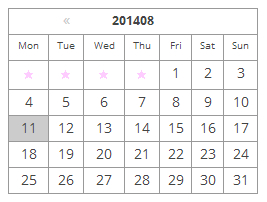
細かいコードの説明は、前記事「WordPress カレンダー カスタマイズ」と同じなので省略します。
自分でカスタマイズしたい場合
このデザインではなく、自分でカスタマイズしたい場合は、テーマの function.php に get_calendar() の内容を my_calender() としてコピペすれば出来そうなのですが、エラーになるので、以下の部分の削除などが必要になります。
1390 ~ 1419 行あたりの以下の部分と、
$cache = array();
	$key = md5( $m . $monthnum . $year );
	if ( $cache = wp_cache_get( 'get_calendar', 'calendar' ) ) {
・・・・・(省略)・・・・・
	if ( isset($_GET['w']) )
		$w = ''.intval($_GET['w']);
1580 ~ 1595 行あたりの以下の部分を削除して、
$cache[ $key ] = $calendar_output;
	wp_cache_set( 'get_calendar', $cache, 'calendar' );
・・・・・(省略)・・・・・
	/** This filter is documented in wp-includes/general-template.php */
		return apply_filters( 'get_calendar', $calendar_output );
	}
以下を加えます。
echo $calendar_output;
そうすれば、function.php の中でカレンダーを好きなようにカスタマイズ出来るかと思います。
WordPress 土日にクラスを付けて色を変えたい
最後に、土日にクラスを付けて色を変えてみようと思います。
if ( $day == gmdate('j', current_time('timestamp')) && $thismonth == gmdate('m', current_time('timestamp')) && $thisyear == gmdate('Y', current_time('timestamp')) )
			$calendar_output .= '<td id="today">';
↓ の下に以下のコードを追加
else if(5 == calendar_week_mod(date('w', mktime(0, 0 , 0, $thismonth, $day, $thisyear))-$week_begins))$calendar_output .= '<td id="class-td">';
else if(6 == calendar_week_mod(date('w', mktime(0, 0 , 0, $thismonth, $day, $thisyear))-$week_begins))$calendar_output .= '<td id="class-td">';
foreach ( $myweek as $wd ) {
		$day_name = (true == $initial) ? $wp_locale->get_weekday_initial($wd) : $wp_locale->get_weekday_abbrev($wd);
↓ の下に以下のコードを追加
if($day_name=='日')$wday_class =' class="sun-td"';
if($day_name=='土')$wday_class =' class="sat-td"';
CSSに追加
#wp-calendar .sat-td{ background:#CCFFFF;}
#wp-calendar .sun-td{ background:#FFCCFF;}
表示はこのような感じで出来ました。

関連記事
-

-
WordPress twentyseventeen の function.php を見る – その2
前回の続きです。 次のスターターコンテンツは、今回のシンプルテンプレートには不要ですが、よくわ
-

-
PHPフレームワークについて
フレームワークとは? 開発する際に頻繁に必要とされる汎用的な機能をまとめて提供している、アプリケー
-

-
WordPress タイトルの変更
テンプレートタグ the_title(); get_the_title(); WordPress
-

-
WordPress リビジョンを削除し、テーブルを最適化してDBの容量を削減
WordPress リビジョン機能 リビジョンは過去の記事を保存してくれる WordPress の
-

-
WordPress レスポンシブ テンプレートコーポレート用(シンプル・カスタマイズ用)ダウンロード
WordPress レスポンシブ テンプレートコーポレート用(シンプル・カスタマイズ用)ダウンロード
-

-
「All-in-One WP Migration」プラグインで 簡単に WordPress のサーバー移行する手順メモ
1.移行元サイトでのデータエクスポート 「All-in-One WP Migration(公式リン
-

-
WordPress レスポンシブ テンプレート 元にサイトを作ってみる その2
DEMO を見る カスタム投稿タイプ functions.php 今回は3つのリストメニュ
-
-
WordPress カレンダー カスタマイズ
WordPressでカレンダーの表示部分をいじってみようかと思います。 どうやら、カレンダー関
-

-
日本語対応の オープンソースの美しい フォント Noto Sans CJK が出来たらしい
Google Earth が出来た時も、Google ストリートビューが出来た時も、 Google
-

-
Javascript 写真ギャラリー サムネイルスライド横 レスポンシブ対応
Javascript でマウスドラッグのテストをしていきます。 分かりやすいように、ボールを投げる
- PREV
- WordPress の PHP をちょっと見てみよう Ⅲ
- NEXT
- Web アイコンフォント 作り方